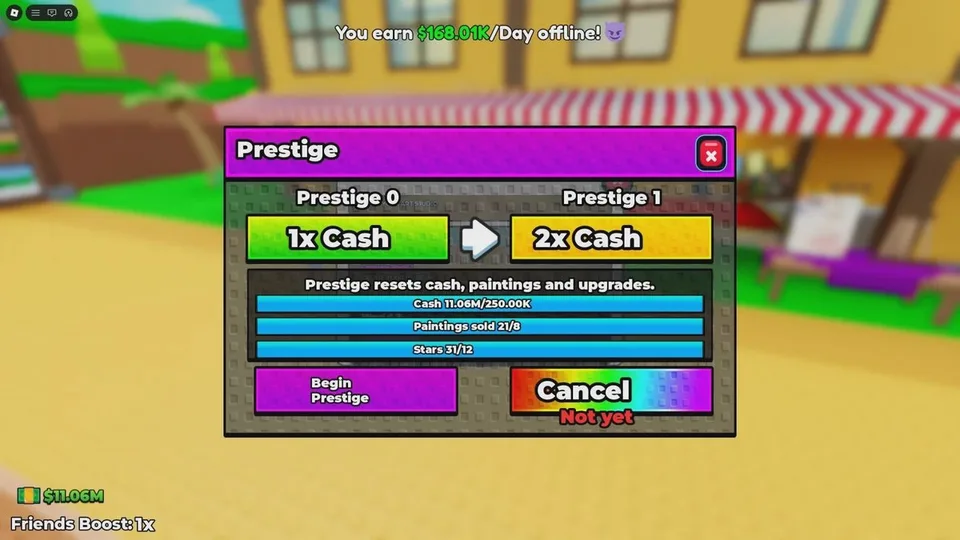
Prestige is a full run reset. It is stricter than a typical tycoon rebirth. The studio, the Cash, the paintings, the painting archive, the hired artists, and the upgrades all go away. What you keep is a permanent Cash multiplier on later Cash. The size of that multiplier is shown when you Prestige. It is not published here as a fixed percent.
You also need Prestige to open worlds. Artist Alley is the studio world you start on. Guides currently report that World 2, the Museum, unlocks at Prestige 3. The Museum Bound badge confirms that World 2 exists. The badge text does not print the level. If the live game shows a different unlock prompt, follow that prompt.
Three requirements
The Prestige menu tracks three goals. The exact targets are the ones printed there. They are not reproduced as fixed numbers in public notes, and they can change. Do not copy an old number into the menu.
| Requirement | How it moves | What does not complete it |
|---|---|---|
| Cash | Selling paintings, including auctions | Leaving paintings undisplayed, or spending the Cash the menu still requires |
| Paintings sold | Accepting a buyer's deal with Sell | Finishing canvases you never sell |
| Stars | Finishing a painting | Waiting for hired NPC painters to do the push |
Stars can advance at the easel, before a buyer pays. The sold-painting counter happens when you press Sell. A stack of finished paintings that you never sell fills Stars and leaves the sold-painting line short. Hired painters are called out as too weak to dent these requirements, so a Prestige push is still your own brush.
How to confirm it
- Open the Prestige button on the left side of the screen.
- Check that Cash, paintings sold, and Stars all meet the lines in that menu.
- Press Begin Prestige.
- Read the confirmation. The wipe does not start when you merely open the menu. This dialog is the last point before the reset.
- Confirm. A short cutscene plays, then the run resets and the Cash multiplier applies.
If any line is short, back out. There is no documented way to undo the wipe. The Fresh Canvas badge marks the first completed Prestige.
When the reset is worth it
Do it when the menu is complete and you have already used the studio you are about to lose.
- Spend Cash on green buttons while you are still climbing the requirements, because a bigger studio is what improves offers.
- Once you are close to the Cash requirement, stop spending the amount the menu still needs.
- Auction your best remaining grade if the auction is available and off cooldown. That sale can be the one that clears the Cash or sold-painting line.
- Expect to rebuild Artist Alley from the starter stall. The multiplier is the head start. Old paintings and old buttons do not return.
Artist Alley and the Museum
| World | What you build | How you get there |
|---|---|---|
| Artist Alley | A studio, using the green buttons | Starting world |
| Museum | A museum, using that world's upgrade purchases | Reported at Prestige level 3 |
Both worlds use the same idea: paint, display, sell, and buy upgrades. The Museum is not described as a combat map. Further worlds are mentioned only as something planned for later updates, including a line that more worlds would come through weekly updates. No later world has a published name.
Rebuild order after a Prestige
- Paint and sell one canvas before you worry about the Museum.
- Buy the early green buttons again. The multiplier should make those sales faster than the first run. The button prices are still whatever the plot prints.
- Reopen the auction when the third floor returns, and reserve it for top grades.
- Repeat Prestige until the Museum prompt appears if that world is the goal.
- On the Museum plot, buy the upgrades that construct the museum. They are a new set, not the Artist Alley buttons you just lost.