Prestige

Prestige

Reset the whole run for a permanent Cash multiplier. Guides report the Museum at Prestige 3.

Prestige in Paint to Get Rich 🎨

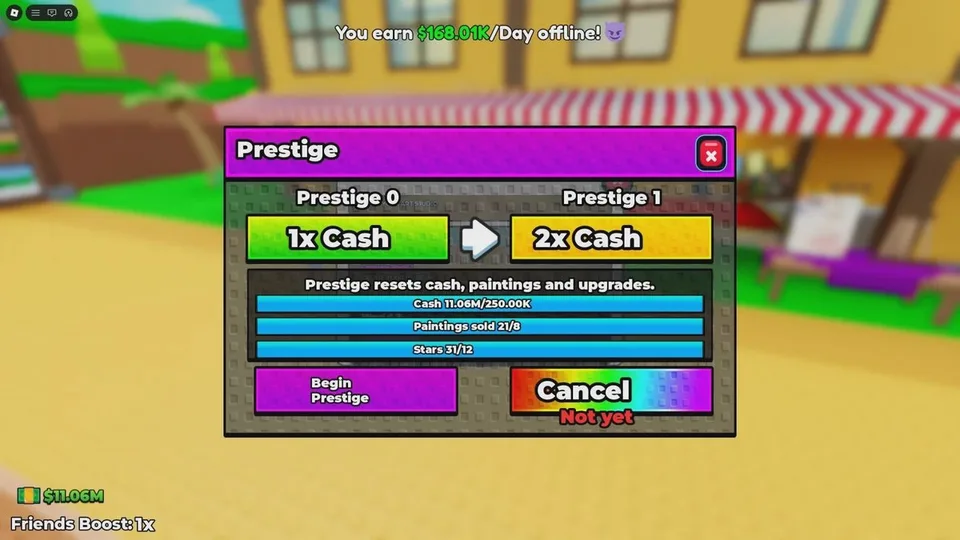
Prestige: Reset the whole run for a permanent Cash multiplier. Guides report the Museum at Prestige 3. Get it by Meet all three lines in the Prestige menu, press the Prestige button on the left, press Begin Prestige, and confirm. Use it to Use it when you want the multiplier or the next world, and only after the…

What is Prestige?

Prestige asks you to earn a menu-specified amount of Cash, sell a menu-specified number of paintings, and earn a menu-specified number of Stars. The Prestige button is on the left. Begin Prestige opens a confirmation, then a short cutscene, then the wipe. You lose the studio, upgrades, Cash reserves, painting archive, and hired artists. You gain a permanent Cash multiplier on all later earnings. Guides report that World 2, the Museum, unlocks at Prestige level 3. The Fresh Canvas badge marks the first completed Prestige.

Published facts

Prestige facts
FactValue
What you keepPermanent Cash multiplier
What you loseStudio, upgrades, Cash, paintings, archive, and hired artists

How do you get Prestige?

Meet all three lines in the Prestige menu, press the Prestige button on the left, press Begin Prestige, and confirm.

How do you use Prestige?

Use it when you want the multiplier or the next world, and only after the three lines are actually full. There is no documented undo. Rebuild from the starter studio afterward.

FAQ

Prestige questions

What is Paint to Get Rich?

It is a free Roblox Simulation / Tycoon by Toasty Works. You paint a canvas, put it on display, and sell it for Cash. That Cash pays for green studio buttons. Prestige wipes the run for a permanent Cash multiplier, and World 2 is the Museum.

Is Paint to Get Rich free?

Yes. The Roblox listing has no entry price. Gameplay notes do not publish a pass list, so this guide does not invent one.

How do I sell a painting?

Finish the canvas, place it on a display stand, wait for a buyer, then negotiate or press Sell. Stars for the Prestige menu are tied to finishing the painting. The sold-painting line moves only when you accept a sale.

When should I Prestige?

Open the Prestige button on the left and read the three live lines: Cash, paintings sold, and Stars. Confirm only when all three are full and you accept losing the studio, Cash, paintings, hired artists, and upgrades. Guides currently report that the Museum opens at Prestige 3. Follow the in-game prompt if it shows a different requirement.

Are there codes?

No code string is documented, and no redeem button has been described. Do not enter codes from other Roblox painting games.

What does a star rating mean?

Finishing a painting gives an appraisal. Roblox badges confirm that a painting can be rated four stars or five stars. What produces that grade, stroke count or picture complexity, is not published. Read the grade on the canvas you just finished.